



![Claw Hammer 20oz [Poly/Fibre Handle]](/image.php?filename=pf501.jpg&stockcode=PF501&category=0030&width=150&height=150 "Claw Hammer 20oz [Poly/Fibre Handle]")
Loyalty Reward Points
Posted on 22-06-2015
The eShop Customer Loyalty Points Module rewards customers with loyalty points for each purchase that can then be used as a cash value to discount future purchases.
The eShop Customer Loyalty Points Module rewards customers with loyalty points for each purchase that can then be used as a cash value to discount future purchases.
The eShop Budget Management Module has been designed to be simple to use and maintain with minimal setup time and provides the method of setting and managing the budgets levels for prof.ITplus customer accounts.
OGL Computer is delighted to announce that they donated over £30,000 to local charities, clubs and associations during 2014.
The eShop Manager Approval Module allows you to setup Users’ and ‘Managers’ access levels on the website.
Any orders that are sent for approval for the manager will alert via email both the User that submitted the request and the manager it was sent to and will be displayed within the website portal for both to view. (web orders only)
In order for a user to send an order request to a manager both the manager and users customer accounts must be linked by the same invoice account reference in prof.ITplus.
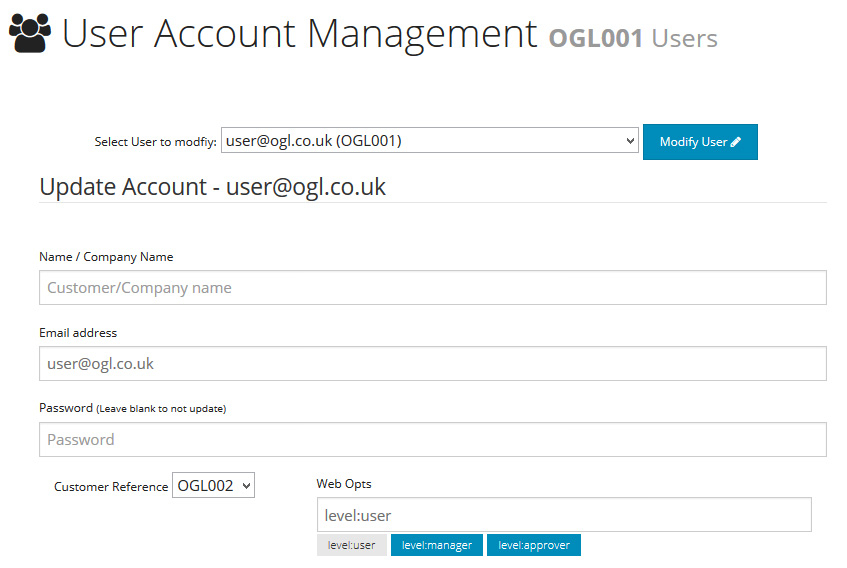
The eShop Budget Management Module provides a method of setting and managing the budgets levels for web customer accounts. (This applies to online web orders only)
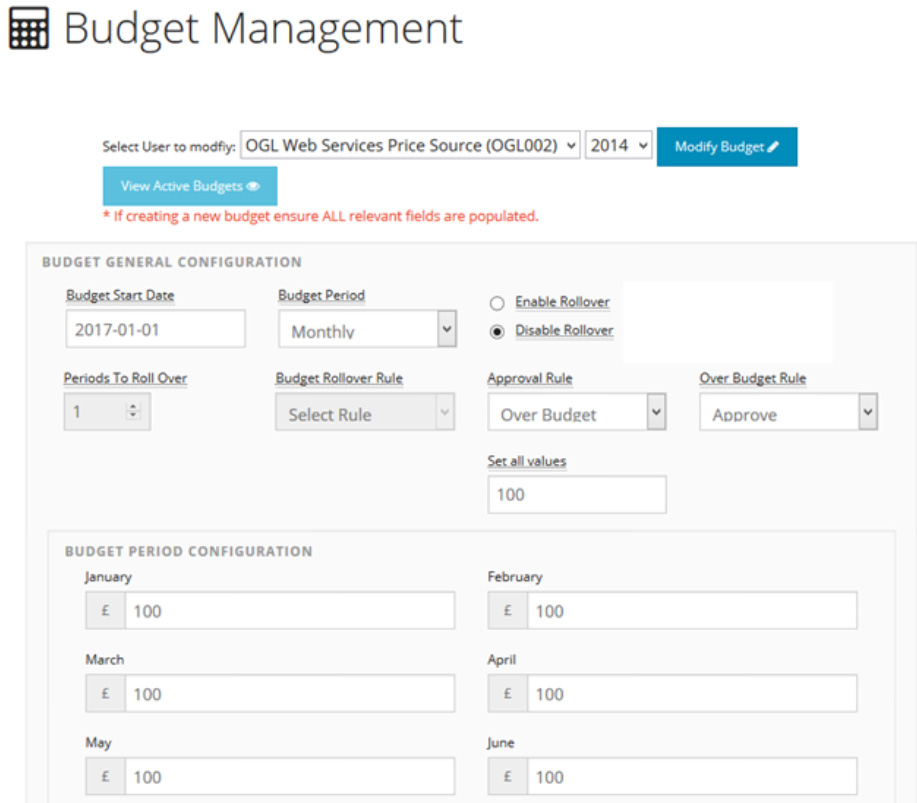
When working with the Manager Approval module, various rules can be set to configure the budget and User access level for a customer. This depends on how the manager wants to handle that particular account. For example, an option can be set to force all orders made through the website checkout, to be sent through to a manger for approval, or alternatively just orders that are over the allocated budget for the current period.
Once a workable budget is in place on the website, the functionality of the eShop Budget Management Module focuses on making sure that expenditures for any particular prof.ITplus User account, remain within the control of the account manage for online orders.
Budget Parameters include:
Implementation of this feature includes up to 2 hours of consultation time during the setup and configuration onto the eShop (this includes communication via both telephone and email consultation).
The Manager Approval and Budget Control eShop feature has specific functionality that can be configured within specific parameters. Any changes to the way the feature functions or looks outside of what is controlled by the parameters will be subject to additional cost. To implement this feature onto an existing eShop, the current eShop platform may need to be upgraded to a later eShop version. The later eShop version may also contain some additional standard eShop enhancements that would also automatically be applied as part of the upgrade and could introduce some styling and/or code conflicts elsewhere on the website. OGL will carry out basic testing before handing over the site for acceptance testing, however it is ultimately the customer’s responsibility to ensure a full site wide test are undertaken before accepting the work to make the changes available in the live environment.