



![Claw Hammer 20oz [Poly/Fibre Handle]](/image.php?filename=pf501.jpg&stockcode=PF501&category=0030&width=150&height=150 "Claw Hammer 20oz [Poly/Fibre Handle]")
Loyalty Reward Points
Posted on 22-06-2015
The eShop Customer Loyalty Points Module rewards customers with loyalty points for each purchase that can then be used as a cash value to discount future purchases.
The eShop Customer Loyalty Points Module rewards customers with loyalty points for each purchase that can then be used as a cash value to discount future purchases.
The eShop Budget Management Module has been designed to be simple to use and maintain with minimal setup time and provides the method of setting and managing the budgets levels for prof.ITplus customer accounts.
OGL Computer is delighted to announce that they donated over £30,000 to local charities, clubs and associations during 2014.
The eShop Customer Loyalty Points Module rewards customers with loyalty points for each purchase that can then be used as a cash value to discount future purchases. All customers are initially enrolled in the scheme when creating a web account to give them an incentive to purchase on the website.
The eShop Customer Loyalty Points Module includes an administration area to manage earning and spending rules. The feature also enables a ‘Points Badge’, which displays reward information on each product.
The administration page allows you to view and amend current points for all customers, along with a log showing how the points have been gained and spent for the individual customer. Also enabling flexibility over how Loyalty Points are rewarded and spent.
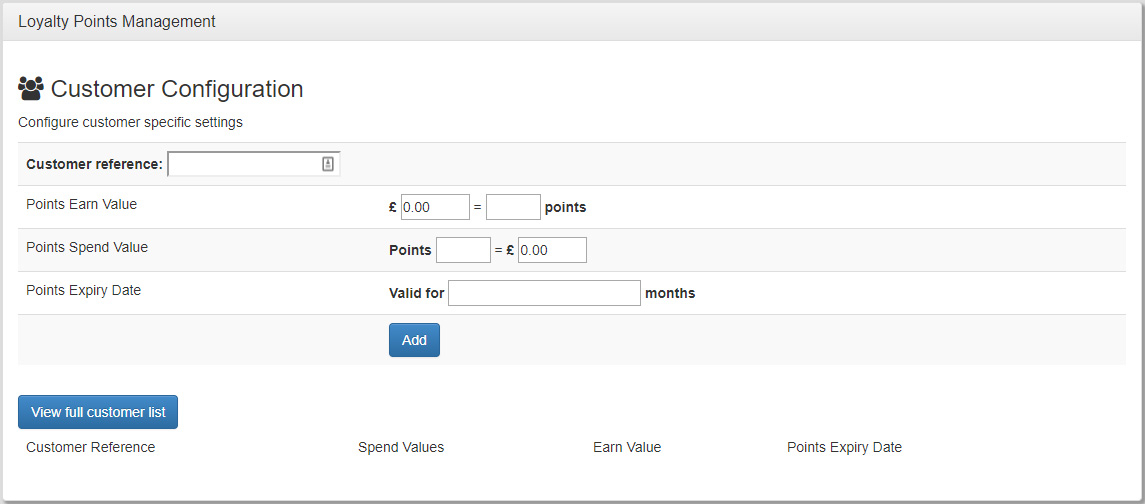
It consists of three options Global, Product Specific and Customer Specific, which can be set as follows:
(Options can apply to over-ride these on a customer by customer basis at your discretion).
This page allows the customer to view a log of the points they have gained and spent. This will show the points added on an order by order basis, and also what points have been redeemed against orders and individual products.
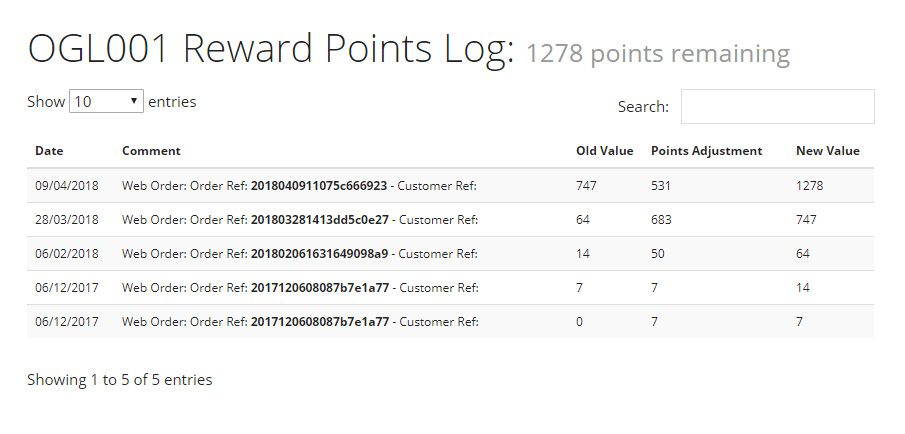
There is an option on the basket page of the website to allow customers to redeem their points in return for either:
Or as an alternative method
An email report is sent out if a redemption is made against an account, and also a monthly email report to all registered and enrolled customers.
(This email layout/design is customisable via prof.ITplus)
If required, the configuration of points via the ‘Global’, ‘Product Specific’ and ‘Customer Specific’ settings can have an expiry time period applied. Customers of the website will be emailed a report showing them a statement of their points balance and advise them of any points that are going to expire.
Additional extra functionality:
Extending to Offline Orders is not a standard part of the Loyalty Points Integration and will therefore entail additional costs.
The Loyalty Points module can be integrated with orders raised via prof.ITplus to allow spending of points on the website.
Any invoices raised via prof.ITplus have their points value calculated and sent out to the website, as an incentive for the customer to use the website in the future.